
PCBA Studio works with Autodesk Fusion
The fusion360-cad skill teaches an AI agent to drive Autodesk Fusion through Autodesk's own MCP server. Describe the board, and the agent builds the mechanical parts around it in a design you can open, edit, and check.
From board numbers to a printable part
The agent writes short Fusion API scripts, runs them in your open Fusion session, and reads back the measured result after every step.
- Enclosures and housings sized from the board outline, with clearance, wall thickness, and rounded corners
- Standoffs and screw bosses on the mounting holes, sized for self-tapping screws or heat-set inserts
- Connector cutouts at the connector's real height and position, such as USB-C on the board edge
- Separate housing, board, and lid components, checked for interference
- Driving dimensions as Fusion user parameters, so you can change the design without the agent
- STEP, STL, and 3MF exports for your mechanical team or your slicer
- Board outline, holes, and part positions read from a Fusion Electronics design when you have one
- 3D models of bought components from the datasheet drawing and product photos, built on the footprint origin and exported as a coloured STEP for your ECAD library
Ask in plain language
My board is 60 x 40 x 1.6 mm with four M3 holes 3.5 mm from each corner.
USB-C is centered on one short edge. The tallest part on top is 12 mm,
bottom-side parts are up to 2 mm. Build a 3D-printable enclosure with
standoffs and a separate lid in Fusion, then check it for interference.
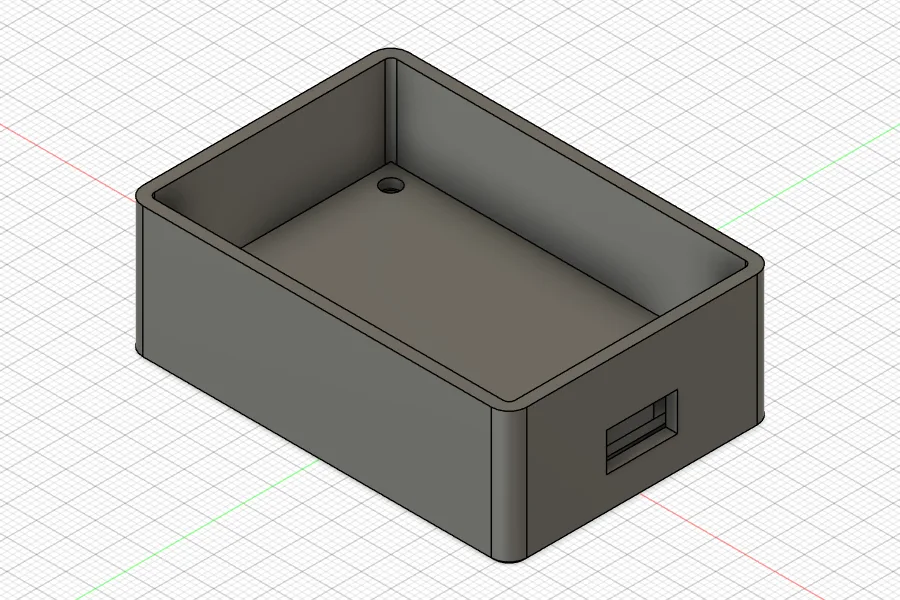
In testing, this request produced a 65 × 45 mm housing with 2 mm walls, four standoffs on the board's holes, a USB-C cutout, and a friction-fit lid. The interference check found no overlaps, and every volume matched a hand calculation.
It measures before it reports
A CAD agent that builds the wrong thing confidently costs more time than it saves. The skill makes the agent check its own work the way an engineer would.
- Millimeters, checked
- The Fusion API works in centimeters. The skill converts every length explicitly and sanity-checks printed sizes, so a 60 mm board never becomes 60 cm.
- Numbers, then pictures
- After each step the agent compares bounding boxes and volumes with values it can compute by hand, then takes a screenshot from the view that shows the feature.
- One step, one transaction
- Each script is a single undoable step. If a self-check fails, the script stops and Fusion rolls the change back, so a half-built feature never stays in the model.
- Your documents stay yours
- The agent works in a new design, tags it, and refuses to run against any other open document. It asks before it merges bodies, saves, or picks a project.
Set it up
Step 1
Turn on the Fusion MCP server
In Autodesk Fusion, open Preferences > General > API and enable the Fusion MCP Server. Keep Fusion running while you work.
Step 2
Connect your agent
Add the Autodesk Fusion connector to Claude or another MCP client. Then download fusion360-cad.zip from this page and add it as a skill: upload it in Claude, or unpack it into your agent's skills folder.
Step 3
Describe the part
Give the board size, holes, connectors, and component heights, or point the agent at a Fusion Electronics design. Review the model in Fusion before you print it or send it out.
The design stays in Fusion
The Fusion MCP server runs on your machine, and the skill is a set of instructions for the agent, not a service. Nothing about the board or the model is sent to pcbastudio.com. Your agent's provider sees what you share with the agent.
What it does not do
- It does not replace a mechanical review. Check fit, tolerances, and the process rules before you order parts.
- It does not route copper or check PCB design rules. That stays with your ECAD tool and with Gerbtrace.
- Its rules for FDM, resin, CNC, molding, and sheet metal are starting points. Your supplier's numbers win.
Autodesk and Fusion are registered trademarks or trademarks of Autodesk, Inc. PCBA Studio is not affiliated with or endorsed by Autodesk.